

How to Calculate ROAS in 2026: Formula, Real Examples in Dollars, and a Free Calculator
Every dollar you spend on ads should bring back more than a dollar in revenue. ROAS tells you exactly whether that's happening — and by how much. Here's how to calculate it, what the numbers actually mean, and how ROAS compares to ROI, CPA, and LTV.
What Is ROAS and Why Does It Matter in 2026?
ROAS stands for Return on Ad Spend. It is the single most straightforward way to measure whether your advertising is generating revenue.
If you run Google Ads, Meta Ads (Facebook and Instagram), TikTok Ads, or any paid media — ROAS answers one question: for every dollar I spent on ads, how many dollars came back as revenue?
In 2026, with ad costs continuing to rise across every major platform, understanding your ROAS is no longer optional. It's the difference between scaling profitably and burning cash without knowing it.
The good news? Calculating ROAS is dead simple. You only need two numbers.
The ROAS Formula (It Takes 3 Seconds)
THE ROAS FORMULA
ROAS = Revenue from Ads ÷ Ad Spend
That's it. No complex math. No spreadsheet required.
If you want ROAS as a percentage, multiply the result by 100:
ROAS AS PERCENTAGE
ROAS % = ROAS × 100
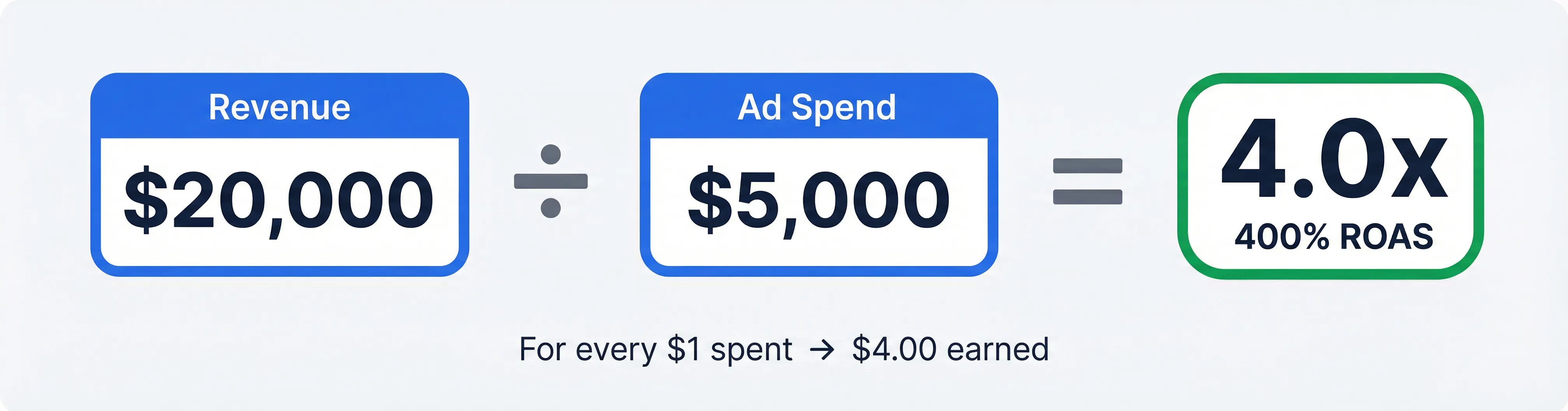
The ROAS formula is one of the simplest calculations in digital marketing.
Or skip the math entirely and use our free ROAS calculator — enter your ad spend and revenue, and get your ROAS ratio, percentage, and per-dollar breakdown instantly.
Want to calculate your ROAS right now?
Enter your ad spend and revenue — get your result in seconds.
Open Free ROAS Calculator →ROAS Calculation Examples in Dollars
Numbers make more sense with real scenarios. Here are three examples using USD — the kind of numbers real advertisers deal with every day.
Example 1: An Ecommerce Store Running Facebook Ads
📊 Example Calculation
Ad Spend: $3,000 | Revenue: $12,000
ROAS = $12,000 ÷ $3,000 = 4.0x (400%)
Translation: for every $1 you spent on Facebook ads, you earned $4.00 in revenue.
Example 2: A Google Ads Search Campaign
📊 Example Calculation
Ad Spend: $10,000 | Revenue: $25,000
ROAS = $25,000 ÷ $10,000 = 2.5x (250%)
So what does a 2.5 ROAS mean? It means every dollar spent on Google Ads generated $2.50 back in revenue. Whether that's good enough depends entirely on your profit margins — but now you know exactly where you stand.
Example 3: A Dropshipping Store
📊 Example Calculation
Ad Spend: $1,500 | Revenue: $6,000
ROAS = $6,000 ÷ $1,500 = 4.0x (400%)
Looks great on the surface. But for dropshipping, a 4x ROAS doesn't always mean profit. Once you subtract product cost, shipping, and platform fees, your actual margin could be thin. That's where a break-even ROAS calculator becomes critical — it tells you the minimum ROAS you need to actually make money.
What Is a Good ROAS?
This is the most common question advertisers ask. And the honest answer is: it depends on your business.
There is no magic number. A 2x ROAS could be highly profitable for a SaaS company with 90% margins. That same 2x could mean a loss for a dropshipper with razor-thin margins.
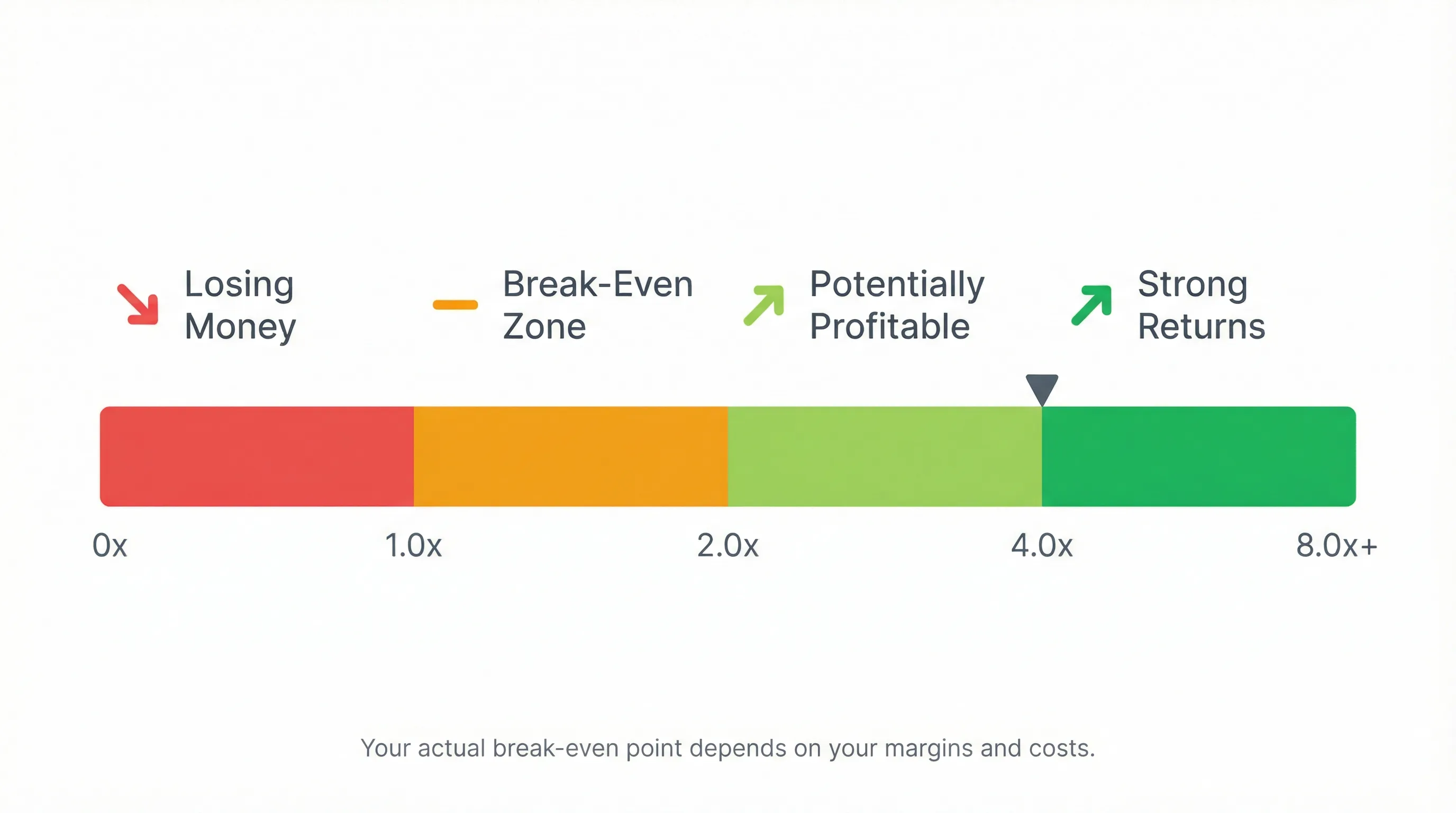
What different ROAS ranges typically mean for your business.
Here's a more useful way to think about it:
- ROAS of 1.0x — You broke even on revenue. But after product costs, you almost certainly lost money.
- ROAS of 2.0x–3.0x — Could be profitable for high-margin businesses. Risky for low-margin ones.
- ROAS of 4.0x+ — Generally strong. But "good" still depends on your specific cost structure.
- ROAS of 8.0x (800%) — Is 800% ROAS good? In most cases, yes — that's $8 back for every $1 spent. But verify that it accounts for all your real costs.
The bottom line: stop chasing someone else's ROAS benchmark. Instead, calculate your own break-even ROAS — the minimum ratio where your ad spend stops losing money and starts generating profit. Our Break-Even ROAS Calculator does exactly that.
ROAS vs ROI vs CPA: What's the Difference?
These three metrics are the most commonly confused in digital marketing. Here's how they differ — and when to use each one.
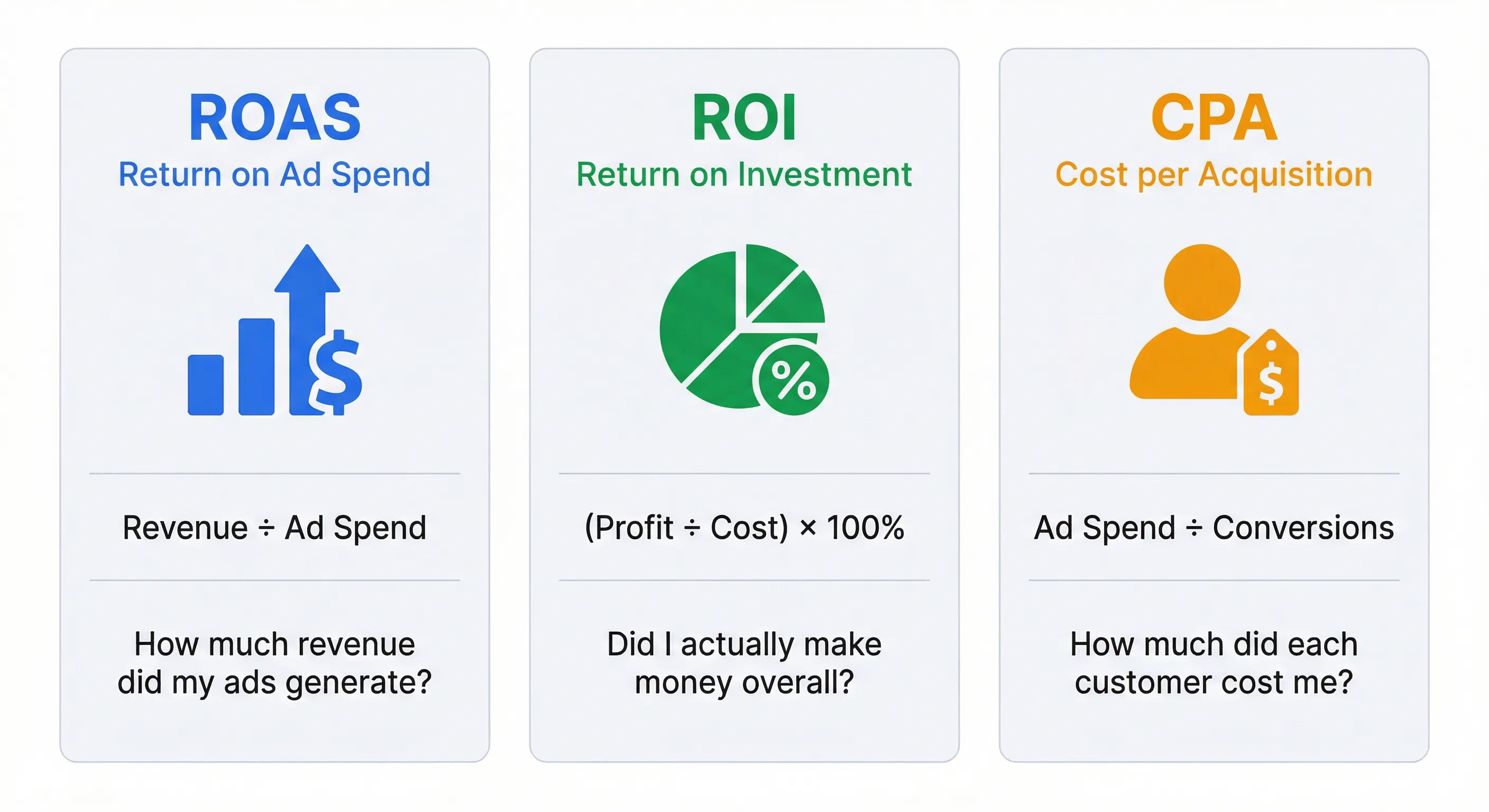
ROAS, ROI, and CPA each measure something different — use the right one for the right question.
| Metric | What It Measures | Formula | Best For |
|---|---|---|---|
| ROAS | Revenue per dollar of ad spend | Revenue ÷ Ad Spend | Evaluating ad campaign efficiency |
| ROI | Net profit relative to total investment | (Profit ÷ Total Cost) × 100% | Overall business profitability |
| CPA | Cost to acquire one customer | Ad Spend ÷ Conversions | Customer acquisition efficiency |
ROAS tells you how much revenue your ads generated. ROI tells you whether your entire business effort was profitable. CPA tells you how much it cost to get each customer.
They answer different questions. Smart marketers track all three — but ROAS is the fastest way to know whether a specific campaign is pulling its weight.
There's one more metric worth mentioning: LTV (Lifetime Value). LTV measures the total revenue a customer generates over their entire relationship with your business. When you compare CPA to LTV, you get a much better picture of long-term profitability than ROAS alone can give you.
How to Calculate ROAS for Google Ads
If you run Google Ads, you can find your ROAS directly in your Google Ads dashboard — Google calls it "Conv. value / cost" in the columns.
But here's the catch: Google's ROAS number is only as accurate as your conversion tracking. If your conversion value setup is incomplete — tracking only some transactions, or using estimated values — the ROAS Google shows you could be misleading.
A safer approach:
- Pull your actual ad spend from Google Ads
- Pull your actual revenue from your store dashboard (Shopify, WooCommerce, etc.) filtered by campaigns
- Divide revenue by ad spend
- Or just plug both numbers into a free ROAS calculator
This gives you a ground-truth ROAS number based on real revenue, not Google's attribution model.
How to Calculate ROAS for Facebook Ads (Meta Ads)
Meta Ads Manager reports "Purchase ROAS" as a default metric. Similar to Google, it relies on the Meta Pixel and Conversions API for accuracy.
Since iOS 14.5 and ongoing privacy changes, Meta's reported ROAS has become less reliable for many advertisers. Many brands see a gap between what Meta reports and what their actual store revenue shows.
The same manual approach works here:
- Total ad spend from Meta Ads Manager
- Actual attributed revenue from your store analytics or UTM tracking
- ROAS = Revenue ÷ Ad Spend
One important note: when comparing Meta Ads ROAS to Google Ads ROAS, remember that these platforms have different attribution windows and models. A "3x ROAS" on Meta and a "3x ROAS" on Google might not mean exactly the same thing.
ROAS for Dropshipping: Why Revenue Isn't the Whole Story
Dropshippers often celebrate a 3x or 4x ROAS — but many discover they're still losing money. Why?
Because ROAS only measures revenue, not profit. In dropshipping, your cost structure looks like this:
- Product cost (often 30–60% of revenue)
- Shipping costs
- Platform fees (Shopify, PayPal, Stripe)
- Returns and refunds
- Ad spend
After subtracting all of that, a 4x ROAS can easily turn into a 5% net margin — or even a loss.
If you're in dropshipping or any low-margin ecommerce, knowing your ROAS alone isn't enough. You need to know your break-even ROAS — the minimum ROAS where you stop losing money. Calculate yours with our Break-Even ROAS Calculator.
Calculate your ROAS in dollars — takes 3 seconds.
No signup. No email. Just your numbers and your answer.
Use the Free ROAS Calculator →5 Ways to Improve Your ROAS
If your ROAS isn't where you want it, here's what actually moves the needle:
- Improve your conversion rate. More conversions from the same ad spend = higher ROAS. Test landing pages, checkout flows, and offers.
- Increase your average order value (AOV). Upsells, bundles, and minimum-order free shipping thresholds can push revenue per transaction higher without increasing ad spend.
- Refine your targeting. Cut audiences and placements that generate clicks but no revenue. Shift budget to what converts.
- Improve your ad creative. Better creative leads to higher click-through rates, lower CPCs, and more efficient spend.
- Fix your tracking. If your conversion tracking is broken or incomplete, your ROAS numbers are meaningless. Audit your pixel, CAPI, and GA4 setup before making any budget decisions.
Frequently Asked Questions About ROAS
ROAS is calculated by dividing your total ad revenue by your total ad spend. For example, if you spent $5,000 on ads and earned $20,000 in revenue, your ROAS is 4.0x or 400%.
A 2.5x ROAS means that for every $1 you spent on advertising, you generated $2.50 in revenue. In percentage terms, that is a 250% return on ad spend.
An 800% ROAS (or 8.0x) means you earned $8 for every $1 spent on ads. This is a strong ratio in most industries. However, whether it is truly good depends on your profit margins and total costs.
ROAS measures revenue per dollar of ad spend. ROI measures net profit relative to total investment. CPA measures the cost to acquire one customer. ROAS is specific to ad efficiency, ROI is broader, and CPA focuses on customer acquisition cost.
There is no universal good ROAS for Google Ads. It depends on your margins, industry, and campaign type. Focus on whether your ROAS covers all your costs, not on hitting an arbitrary benchmark.
Calculate Your ROAS Now
You don't need a spreadsheet. You don't need to log into your ad platform. You just need two numbers: how much you spent, and how much you earned.
Our free ROAS calculator gives you the answer in seconds — as a ratio, a percentage, and a plain-English sentence in dollars. No signup. No email. Just your numbers and your answer.
And when you're ready to go deeper — to find out whether your ROAS actually covers your costs — the Break-Even ROAS Calculator is the next step.
Ready to check your numbers?
Enter your ad spend and revenue — instant results.
Open Free ROAS Calculator →Last updated: March 11, 2026. We review and update this guide regularly to ensure accuracy.
Try the Free Online Tool
Put the formulas and insights from this guide into practice instantly in your browser.
Authoritative Sources & Regulatory References
- Google Ads Support: Measuring Return on Investment in Paid Search
- Meta Ads Manager Guide: Calculate Purchase ROAS for E-Commerce Campaigns
- Shopify Merchant Resources: ROAS Benchmarks and Profitability Metrics for E-Commerce
Financial Disclaimer: ROAS measures gross revenue per ad dollar spent, not net profit. A positive ROAS can still result in a business loss if product COGS and fulfillment costs exceed margin thresholds.

Author & Lead Developer
Mahfuzur Rahman
Lead analyst and developer at Open Online Tools. Specializes in conversion optimization, technical analytics, and client-side computing with over 5 years of industry experience.